
Wxrks is the best localization software for SaaS companies that want translation memory, quality management, workflow automation, and cost tracking in one system. Lokalise wins for mobile product teams, Crowdin for repository-centered localization, Phrase for enterprise governance, Smartling for managed programs, and Weglot for website-only projects in 2026.
- Wxrks is the best overall localization software for SaaS companies that want one system for automation, quality, and cost tracking.
- Lokalise fits mobile product teams that need localization connected to design and development workflows.
- Crowdin suits developer-led SaaS teams managing strings through repositories and continuous localization.
- Phrase and Smartling fit larger programs that need deeper governance or managed localization support.
- Weglot is the narrowest choice: use it for websites, not complex in-product localization.
Why this matters
SaaS localization is part of product delivery, not a final translation task. Every interface change can create new strings, revise existing translations, or break layouts in markets where the translated text is longer than the source.
The wrong platform adds queues between developers, product managers, translators, and reviewers. Files get exported, comments scatter across tools, and approved terminology gets applied inconsistently. The right platform keeps source content, translation memory, glossaries, review status, and quality checks connected to the release workflow.
That distinction matters in 2026 because AI translation alone does not solve localization operations. SaaS teams still need context, human review, terminology control, permissions, reporting, and a reliable route from the source repository to production. A machine translation engine without those controls translates text; it does not manage localization.
What makes the best localization software for SaaS companies
Use these criteria before comparing feature lists:
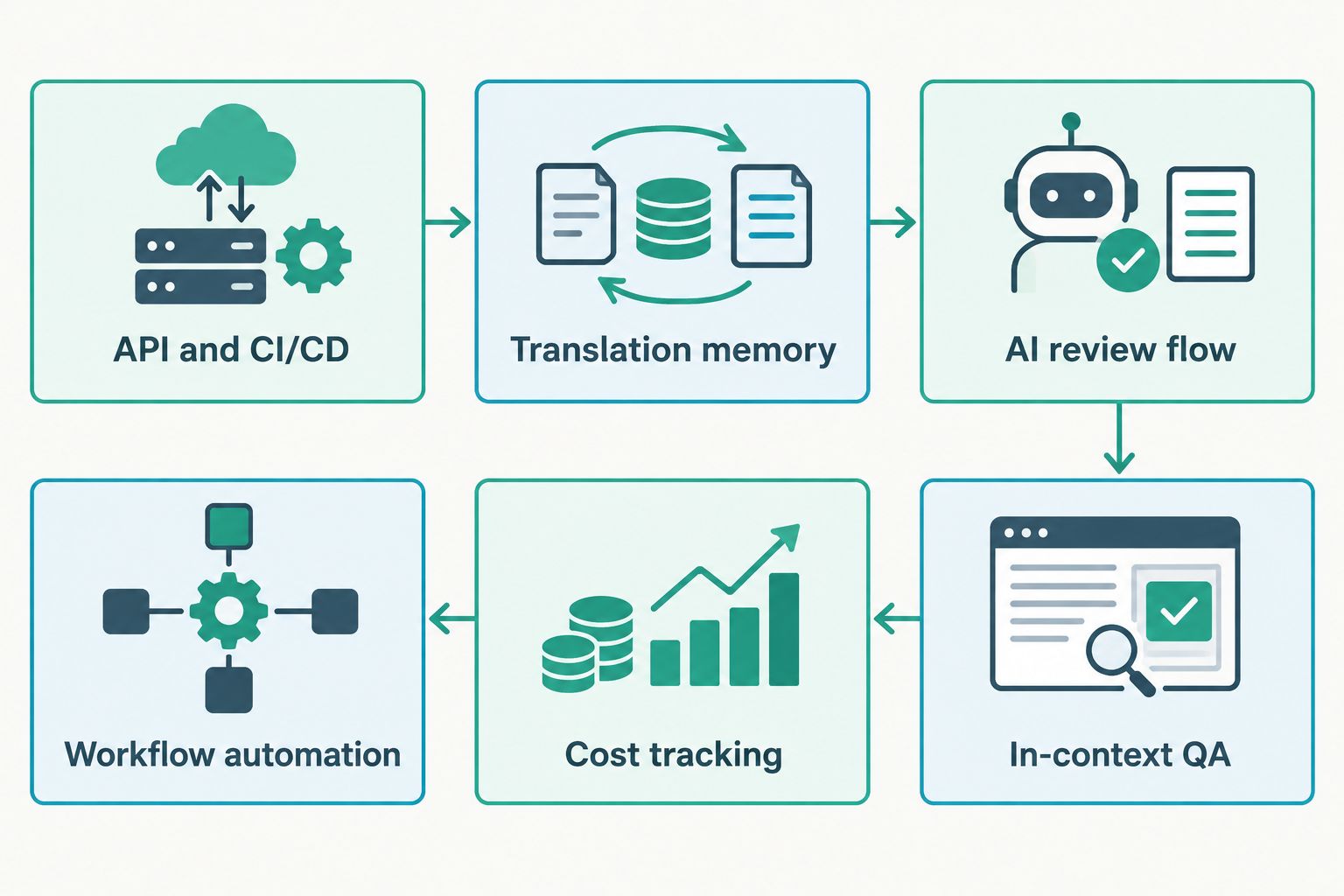
- API and CI/CD: The platform should fit the development workflow, automate file movement, and reduce manual handoffs during a release.
- Translation memory: Approved translations should be reusable across recurring buttons, messages, settings, and product documentation.
- AI review flow: Machine-generated output should move through clear review and approval stages instead of shipping without oversight.
- In-context QA: Translators and reviewers need enough interface context to understand where a string appears and what it means.
- Cost tracking: Product and localization leads should be able to connect translation activity with projects, languages, and workflows.
- Workflow automation: Assignments, status changes, quality checks, and delivery steps should not depend on repeated manual coordination.
A strong platform does not need to lead every category. It does need to match the part of your localization process that creates the most delays. For a developer-led SaaS company, repository integration carries more weight than website editing. For a global enterprise, permissions and review governance carry more weight than rapid initial setup.
Localization software for SaaS companies at a glance
| Tool | Best for | Standout feature | Key limitation |
|---|---|---|---|
| Wxrks | Unified SaaS localization operations | Translation memory, quality management, automation, and cost tracking | Teams must confirm that required integrations fit their current stack |
| Lokalise | Mobile product teams | Developer and design workflow connections | Broader workflow options require deliberate setup and ownership |
| Crowdin | Repository-centered localization | Developer-focused integrations and continuous localization | Community workflows require firm review controls for customer-facing copy |
| Phrase | Enterprise governance | Configurable workflows and localization controls | Its breadth can be excessive for a small team with a narrow use case |
| Smartling | Managed enterprise programs | Software combined with localization service options | The operating model can be heavier than a self-managed team needs |
| Weglot | Public websites | Website translation without rebuilding the underlying site | It is not a full replacement for in-product localization management |
1. Wxrks: best localization software for SaaS companies overall
Wxrks is an AI-powered translation management system for translators, developers, enterprises, and translation agencies. It brings localization workflows, translation memory, quality management, and cost tracking into the same operating environment.
That combination fits SaaS teams that need more than raw machine translation. Developers can treat localization as a repeatable workflow, while translation and product stakeholders retain control over memory, quality, and spending.
Platform pros:
- Combines translation memory with AI-assisted localization workflows.
- Includes quality management rather than treating review as an external task.
- Connects cost tracking with localization operations.
- Supports the technical and linguistic roles involved in continuous localization.
Platform cons:
- Teams should verify every required repository, design, CMS, and deployment integration before migrating.
- A full TMS requires workflow configuration and ownership; it is more than a website translation layer.
Best for: SaaS companies that want product localization, translation memory, quality control, automation, and cost visibility managed together.
Verdict: Buy. It is the strongest default when fragmented workflows are the main problem.
2. Lokalise: best for mobile SaaS product teams
Lokalise is built around software and digital product localization. Its developer, design, and content connections make it a practical fit when mobile interfaces change frequently and localization must follow the product workflow.
The platform is most relevant when designers, engineers, translators, and reviewers all need access to the same string lifecycle. It is less compelling when the project is limited to a small public website.
Lokalise pros:
- Supports workflows spanning product design, development, translation, and review.
- Gives software teams a centralized location for strings and localization status.
- Fits continuous product localization better than a document-focused process.
Lokalise cons:
- Workflow flexibility creates configuration work before the process becomes predictable.
- Non-technical reviewers still need clear roles, views, and approval rules.
Best for: SaaS companies where native mobile applications are a primary customer experience.
Verdict: Buy for mobile-first localization. Hold if your immediate scope is only a marketing website.
3. Crowdin: best for repository-centered localization
Crowdin puts developer workflows close to the center of localization. It is a natural candidate for SaaS teams that manage source strings in repositories and want translation activity connected to software delivery.
Crowdin also supports community translation models, which can fit open-source projects or products with active contributor communities. Customer-facing SaaS copy still needs controlled review, approved terminology, and accountable ownership.
Crowdin pros:
- Fits teams that want repository connections and developer-oriented tooling.
- Supports continuous localization rather than isolated translation batches.
- Can accommodate internal, vendor, and community contributor models.
Crowdin cons:
- Community contributions create extra review demands for brand-critical or regulated content.
- Developer convenience does not remove the need for linguistic governance.
Best for: Engineering-led SaaS companies that want localization organized around source repositories.
Verdict: Buy for repository-driven delivery. Skip if your team cannot maintain a defined review layer.
4. Phrase: best for enterprise localization governance
Phrase serves organizations that need configurable localization workflows across products, teams, and content types. It fits a program where permissions, terminology, workflow stages, and quality controls require formal administration.
That depth is useful when localization spans several departments. It also introduces more decisions during implementation, making Phrase a less direct fit for a small team that only needs a simple string handoff.
Phrase pros:
- Supports structured workflows for complex localization programs.
- Brings translation technology and management controls into one platform family.
- Fits cross-functional organizations that need repeatable governance.
Phrase cons:
- Broad capabilities require process design and administrator ownership.
- Smaller SaaS teams can end up managing functions they do not need.
Best for: Enterprise SaaS organizations with dedicated localization operations and formal approval requirements.
Verdict: Buy when governance is the deciding factor. Hold when a lean team needs a narrower workflow.
5. Smartling: best for managed enterprise programs
Smartling combines translation software with localization service options. That model suits companies that want external operational support alongside workflow technology rather than managing every vendor relationship and review stage internally.
The platform fits a mature localization program with several stakeholders and content streams. A self-managed startup can find the model heavier than necessary when product and engineering already own localization delivery.
Smartling pros:
- Combines workflow technology with managed localization options.
- Supports visual context and structured review processes.
- Fits programs covering product, marketing, and other business content.
Smartling cons:
- The managed model introduces more operational structure than some teams need.
- It is not the simplest choice for a small developer-owned localization workflow.
Best for: Enterprise SaaS companies seeking both a platform and operational localization support.
Verdict: Buy for a managed program. Hold if your team wants direct, self-managed control.
6. Weglot: best for SaaS marketing websites
Weglot focuses on website translation. It is useful when a SaaS marketing team needs to publish a multilingual public site without turning the project into an application localization build.
That narrow focus is also its main limitation. Product interfaces, repository-managed strings, release workflows, and deep translation operations require a full localization platform rather than a website layer.
Weglot pros:
- Keeps the initial website localization workflow focused.
- Provides a visual approach that suits marketing ownership.
- Avoids treating a public website like a software repository project.
Weglot cons:
- It does not replace a TMS for complex in-product localization.
- Teams can create separate website and product workflows that require coordination.
Best for: SaaS companies translating a public marketing site while product localization is handled elsewhere.
Verdict: Buy for website-only scope. Skip as the sole platform for application localization.
How we ranked the platforms
The ranking prioritizes SaaS release workflows over generic document translation. Translation memory, review controls, developer fit, context, automation, and reporting all affect the final position.
No platform wins every use case. The default winner is the system that covers the largest share of an ongoing SaaS localization operation without forcing quality management or cost tracking into separate tools. The specialist choices rank lower overall but can win when mobile delivery, repository control, enterprise governance, managed services, or website translation is the dominant requirement.
Automate your localization workflow
Connect translation memory, quality management, automation, and cost tracking.
Which localization software should you choose?
Choose Wxrks if you need one localization operating system for translation memory, AI-supported workflows, quality management, and cost tracking. It is the default recommendation for SaaS teams replacing disconnected tools or manual coordination in 2026.
Choose Lokalise when mobile product delivery drives the decision. Choose Crowdin when repository-centered localization matters most. Choose Phrase for formal enterprise governance, Smartling for a managed localization model, and Weglot when the project stops at the public website.
Your final shortlist should match the content source and owner. Product strings usually belong with engineering and localization operations. Website copy often belongs with marketing. Documentation can involve both. Buying one platform without naming the owner of each workflow simply moves the bottleneck.
FAQ
What is the best localization software for SaaS companies in 2026?
Wxrks is the best overall option in 2026 for SaaS companies that want translation memory, workflow automation, quality management, and cost tracking in one TMS. Mobile-first, enterprise, and website-only teams may prefer a specialist platform.
Is Lokalise or Crowdin better for SaaS localization?
Lokalise is the better fit for mobile product teams connecting localization with design and development, while Crowdin is stronger for repository-centered workflows. Choose according to where source strings are managed.
Does a SaaS company need a translation management system?
A SaaS company needs a TMS when localization involves recurring product updates, multiple contributors, translation memory, terminology control, or formal review. A simple translation tool does not manage that workflow.
Can localization software connect with CI/CD?
Yes, developer-focused localization platforms can connect string updates with repositories and deployment workflows. Confirm support for your exact source control, file formats, branching model, and release process before choosing.
What is the difference between translation software and localization software?
Translation software converts text between languages, while localization software manages context, strings, terminology, assets, review, and delivery. SaaS products usually need the broader localization workflow.
How much does localization software cost?
Check each vendor's current plan and contract details because the required workflow, languages, users, services, and integrations affect the commercial model. Compare total operating effort as well as the software plan.
Is Weglot enough for SaaS localization?
Weglot is enough for a website-focused project but not for every in-product localization workflow. Application strings, repository connections, translation memory, and release governance can require a dedicated TMS.
One last thing
Choose the workflow before choosing the machine translation engine in 2026. An engine can generate text, but your workflow determines whether the right string reaches the right reviewer with approved terminology and enough context to make a sound decision.
Start by mapping source creation, translation, review, approval, and delivery. Any platform that leaves a critical stage outside the system needs a named owner and a documented handoff. If neither exists, that gap will become the next localization queue.